WordWeb Audio Dictionary
WordWeb SoftwareBooks & Reference
4.653.00 Reviews
- Version
- 6.11
- Installs
- 10.00K
- Age Rating
- Teen
Screenshots
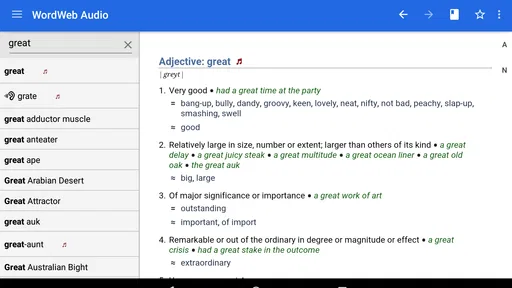
Our Review of WordWeb Audio Dictionary
 Analysis by Appyee
When I need to check how an English word sounds as well as what it means, I want a dictionary that gets me to the answer without turning a quick lookup into a project. That is the appeal of WordWeb Audio Dictionary: it is a paid Books & Reference app from WordWeb Software, built around spoken English and definitions. Its current version is 6.11, and the app has been available since March 31, 2012. That long-running presence is useful context, but I would judge it mainly by whether its approach suits the way you look up words today.
What WordWeb Audio Dictionary is like to use
The app is for people who want a dedicated English reference close at hand, especially when pronunciation matters. Its average rating is 4.6 from 715 ratings, and it has over 10,000 installs. It costs $3.99 and is rated Teen. I see the price as a choice between paying once for a focused dictionary experience and relying on free online search; the better option depends on whether you value quick, dictionary-style consultation enough to keep a dedicated app.
Audio is most useful when a word leaves the page
The spoken-word focus makes the app particularly relevant when you can recognize a word in writing but hesitate to say it. I would use it while reading an article, preparing a presentation, or checking a term before using it in conversation. A definition can explain meaning, but hearing a word gives a different kind of help: it lets you connect the spelling on the screen to a spoken form.
For a practical routine, I would look up the unfamiliar word, read the definition first, and then listen before repeating it aloud. That small sequence helps me avoid treating pronunciation as an isolated sound exercise. I can check that I understand the word and then work on saying it with that meaning in mind. It is a modest workflow, but it is more useful than listening without context.
A specialist dictionary rather than a general search engine
Compared with typing a word into a general web search, a dedicated dictionary can feel more direct: the task stays centered on the word rather than on a mixed page of results. That distinction matters when I want to check a spelling or pronunciation quickly, or when I am already reading and do not want to lose my place. A browser or translation app may be better when the question is about a sentence, a whole passage, or another language. WordWeb’s purpose is narrower, and that can be a strength for focused English lookups.
The trade-off is that a dictionary is not a substitute for a teacher or a full language-learning course. If I need structured lessons, practice conversations, or feedback on my own speech, I would choose a tool designed for those jobs. I would also avoid assuming that hearing a pronunciation alone teaches every regional nuance. Listening is a useful reference, but it does not replace hearing words used naturally in varied conversations.
How it fits into everyday reading and writing
Imagine encountering an unfamiliar word in a work email while you are away from your desk. I would want to check its meaning before replying, then listen to it if I might need to say it in a meeting. For a student, the same habit can help when reading assigned material; for a writer, it can be a quick check before choosing a word. These are small, repeatable moments rather than reasons to open a large study session.
My tip is to look up the word at the point where it causes uncertainty, rather than collecting definitions without a purpose. If I am drafting, I would check whether I understand the word’s meaning before relying on it for a particular tone. If I am learning pronunciation, I would listen and say it once or twice, then return to the sentence where I found it. That keeps the app useful without letting a lookup interrupt the task for too long.
What changed, and what existing users should consider
Version 6.11 is the current release, and the app’s history reaches back to 2012. Those facts show that this is an established product rather than a newly launched dictionary, but they do not by themselves tell me which capabilities have changed between versions. I would not treat age or a version number as proof that a particular feature has recently improved. For someone who already uses WordWeb, the practical question is whether the current app still fits their routine and their device.
For a returning user, I would check the installed version and make sure the app behaves as expected on the device before relying on it for an important study or work task. The minimum operating system is Android 6.0, so compatibility is worth checking if you use an older device. A focused reference app is most valuable when it is easy to reach at the moment you need it; if it no longer fits your setup, a browser dictionary may be the simpler fallback.
Where I would draw the line
The app is a good match for readers, students, writers, and English learners who want a compact reference with spoken words. It is less suitable if your main need is translation, grammar instruction, or guided speaking practice. Those tasks call for different tools, and choosing a dictionary for them can lead to frustration even if the word definitions themselves are useful.
I would also weigh the $3.99 price against how often I expect to use a dedicated dictionary. Someone who checks English words regularly may appreciate having a focused reference ready, while an occasional lookup may not justify another paid app when a free web search is adequate. That is not a flaw unique to WordWeb; it is the central trade-off between a specialist reference and a general-purpose alternative.
What I would watch before relying on it
For a purchase, I would consider three practical questions: does the spoken-word approach match the way I learn, does my device meet the operating-system requirement, and will I use it often enough to prefer a dedicated app? The Teen content rating is also worth noting for anyone choosing apps for a younger user. These checks are more useful than choosing solely by a rating, because they connect the decision to your actual needs.
WordWeb Audio Dictionary has an average rating of 4.6, but a rating cannot tell me whether its particular style is right for every reader. I would focus instead on whether I regularly need both a definition and a spoken reference. If that is a common situation for you, its narrow focus is a sensible reason to try it; if you need broader language coaching, I would look elsewhere.
A considered choice for frequent word lookups
My overall view is that WordWeb Audio Dictionary makes the most sense as a practical English companion for frequent, focused lookups. The long-running release history offers context, while version 6.11 is the current point of reference; neither should be mistaken for a promise about future changes. What matters is whether the app’s spoken-word emphasis helps you move from recognizing a word to understanding and saying it.
If you want a dictionary rather than a full language course, and you expect to check English words often, I think it is a reasonable option to consider. If you mostly need translation or structured lessons, a different kind of app will serve you better. I would choose WordWeb for the moments when I want a direct English reference close by, not as a replacement for every tool involved in learning a language.
Hey there, language lovers! Today, I dove into the world of dictionaries with the WordWeb Audio Dictionary, and let me tell you, it was quite the adventure. If you're anything like me and have a habit of stumbling over words or just love expanding your vocabulary, this app might just be your new best friend. Let's get into the nitty-gritty of what makes this app a must-have on your digital bookshelf.
Features That Make a Splash
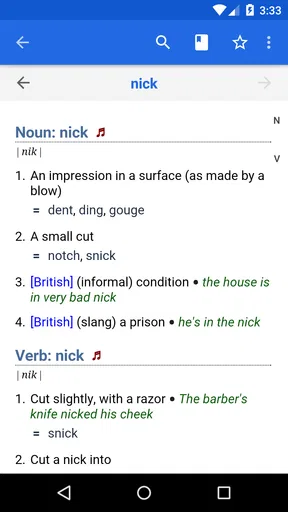
First off, what sets the WordWeb Audio Dictionary apart is its comprehensive approach to words. It's not just about definitions here; it's about understanding, pronunciation, and context. The app boasts a whopping database of over 285,000 words, phrases, and derived forms. That's like having an entire library at your fingertips!
One of the standout features is the audio pronunciation. Have you ever read a word a million times but have no clue how to say it out loud? Well, say goodbye to those awkward moments! The audio feature is crystal clear and helps you nail the pronunciation like a pro. Just tap the little speaker icon, and you're good to go.
User-Friendly Interface
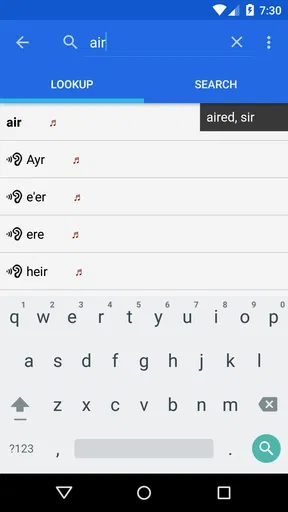
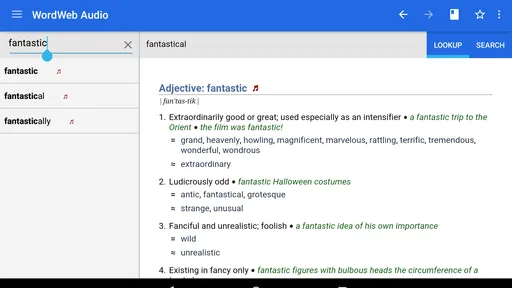
Let’s talk about the interface. It's sleek, intuitive, and incredibly user-friendly. Whether you’re a tech wizard or someone who struggles with apps, you’ll find navigating through WordWeb a breeze. The search function is super responsive, and it even suggests words as you type, which is a lifesaver when you’re not quite sure how to spell something. Talk about having your back!
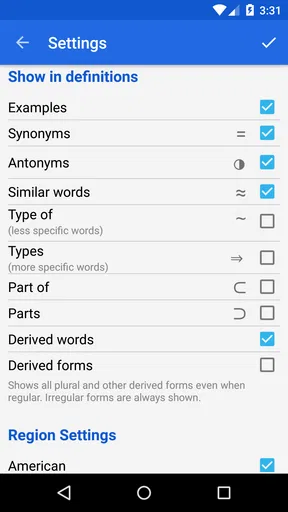
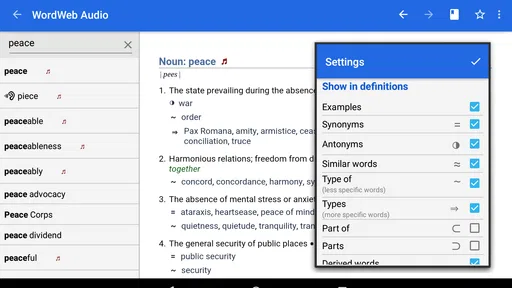
And for those who love a bit of customization, you can tweak the app’s settings to suit your preferences. Whether it’s adjusting the font size or setting your preferred dialect for pronunciation, WordWeb has you covered.
Offline Access: A Game Changer
One of the features that had me doing a little happy dance was the offline access. We’ve all been there, right? You’re in a spotty Wi-Fi area or have no data left, and you desperately need to look something up. With WordWeb, you don't have to worry. The entire dictionary is accessible offline, meaning you can carry your language tool anywhere without a hitch.
Synonyms, Antonyms, and More
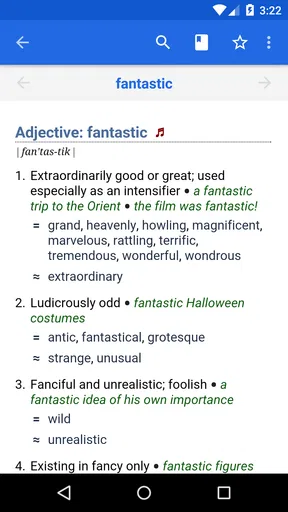
Now, let's chat about synonyms and antonyms. As a writer, these are gold. WordWeb offers a detailed list of synonyms and antonyms for each word, making it a fantastic tool for anyone looking to enrich their writing. Plus, it provides usage examples, which is super helpful when you're trying to grasp the context of a word.
The app also taps into related words and similar-sounding words, so you can really dive deep into the language. It's like having a linguistic playground right in your pocket!
Perfect for Learners and Pros Alike
Whether you're a student, a professional writer, or just someone who loves words, the WordWeb Audio Dictionary caters to all. It supports both British and American English, which is a neat touch, especially if you're trying to learn the nuances between the two.
For non-native speakers, the app is a fantastic resource for learning new vocabulary, improving pronunciation, and understanding word usage in different contexts. It’s like having a personal language tutor ready to help whenever you need it.
Wrapping It Up
So, what's the final verdict? The WordWeb Audio Dictionary is a versatile, easy-to-use app that offers way more than just definitions. It’s a comprehensive language tool that helps you not only understand words better but also pronounce them correctly and use them effectively.
If you’re serious about improving your language skills or just need a reliable dictionary app, give WordWeb a try. It's a pocket-sized powerhouse perfect for anyone looking to enhance their vocabulary. Download it today and start your linguistic journey!
Verdict
Strengths of WordWeb Audio Dictionary
- Comprehensive word database.
- Offline access available.
- High-quality audio pronunciations.
- User-friendly interface.
- Cross-references for deeper learning.
Limitations of WordWeb Audio Dictionary
- Limited language support.
- No real-time translation.
- Ads in free version.
- Basic interface design.
- Requires storage space.
Similar Picks in This Category
View All
Google Play Books & Audiobooks
Google LLC4.7

네이버 - NAVER
NAVER Corp.3.5

Wattpad - Read & Write Stories
Wattpad.com3.7

King James Bible - Verse+Audio
Ozion4.8

Bible Offline-KJV Holy Bible
Bíblia Offline4.9

Amazon Kindle: Reading App
Amazon Mobile LLC4.8
Frequently Asked Questions
What is WordWeb Audio Dictionary and how does it work?
WordWeb Audio Dictionary is a comprehensive English dictionary and thesaurus app, providing definitions, synonyms, antonyms, and audio pronunciations. It works offline, making it convenient for users without internet access. The app features a user-friendly interface and allows you to search for words quickly, offering detailed word information and usage examples.
Is the WordWeb Audio Dictionary available offline?
Yes, the WordWeb Audio Dictionary is fully functional offline. This means you can access definitions, synonyms, and pronunciations without an internet connection. It's particularly useful for travelers or individuals in areas with limited connectivity, ensuring you always have a reliable language reference at hand.
What are the unique features of WordWeb Audio Dictionary?
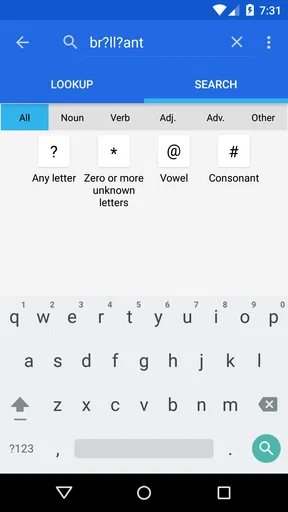
The app offers several standout features, including comprehensive word definitions, a vast thesaurus, and high-quality audio pronunciations. It also supports a wide range of regional dialects and offers usage examples. The app's intuitive search function and ability to bookmark favorite words enhance the user experience significantly.
Does WordWeb Audio Dictionary support multiple languages?
While the primary focus of WordWeb Audio Dictionary is English, it provides detailed coverage of various English dialects. However, it does not support full translations into other languages. It is designed to offer a deep understanding of English vocabulary, making it ideal for English learners and enthusiasts.
Are there any in-app purchases or ads in WordWeb Audio Dictionary?
WordWeb Audio Dictionary offers a free version with essential features. However, there is a premium version available for purchase, which unlocks additional features such as advanced search options and more extensive word databases. The free version contains minimal ads, ensuring a smooth user experience.
